 Fortnox + Claude
Ask Claude about
your books in Fortnox.
See what to pay this week, how the month went and which invoices are waiting, by asking Claude. The answers come from your own books in Fortnox.
Want to see it work first? Try it on a demo company
199 SEK per Fortnox company per user per month, so 199 SEK for you in your company. Bought in Fortnox. 30-day right to cancel (öppet köp).
| Invoice | Due | Customer | SEK |
|---|---|---|---|
| 4198 | 28 Aug | Nordlys Konsult | 18,750 |
| 4207 | 4 Sep | Holm & Dahl Bygg | 9,400 |
| 4219 | 9 Sep | Strandvik Fastigheter | 12,500 |
Example · invented customers and invoices.
Questions you can ask Claude about your company
Claude answers from the data in your Fortnox company. The questions can look like this.
“Which supplier invoices should I pay this week?”
Read only“How did the month go compared with the same month last year?”
Read only“Which customer invoices are more than 30 days overdue?”
Read only“Which supplier invoices are missing a voucher?”
Read only“Credit customer invoice 4231.”
Needs approval“Create a customer invoice to Nordlys Konsult for 12,500 SEK for premises rent.”
Needs approval
Claude can also help with the bookkeeping itself: suggest account coding, prepare a voucher and reconcile. You read the proposal before anything is booked.
You approve every change before it is made
Nothing changes in Fortnox until you approve it.
When you ask Claude to create, change or credit something, Nordsynk opens a preview. It shows what will happen in Fortnox, with customer and amount, and you choose Approve or Decline.
An approval covers only that exact change. Questions that only read need no approval.
Example · invented invoice
Credit invoice 4231 to Nordlys Konsult.
I have sent the change for approval. Open the preview and review it.
Approve the change in Fortnox?
Awaiting approvalCredit customer invoice 4231
This creates a credit invoice for customer invoice 4231 in Fortnox. The original invoice stays as it is.
- Company
- Acme Bygg AB
- Customer
- Nordlys Konsult AB
- Credits
- Customer invoice 4231
- Amount
- −12,500.00 SEK
Applies only to exactly this change. If anything changes, Nordsynk asks again.
What does Fortnox in Claude cost?
You buy Nordsynk in Fortnox and pay on your regular Fortnox invoice.
Fortnox + Claude
199 SEK
per Fortnox company per user per month, through Fortnox
You need a Nordsynk seat in each Fortnox company where you use Claude. A seat in one company does not cover the others: a user in three companies needs three seats.
The price is for Nordsynk. Claude is not included and is priced by Anthropic.
How to connect Claude to Fortnox
It takes a few minutes. You buy Nordsynk in Fortnox, the seat is assigned to you, and then you add the connection in Claude Desktop or on claude.ai.
If the button does not open Claude, follow the steps below.
Claude Code (then run /mcp)
claude mcp add --transport http nordsynk https://mcp.nordsynk.se/mcp- 01
Buy Nordsynk in Fortnox
An administrator buys Nordsynk for the company in Fortnox Marketplace. It takes under a minute.
- 02
Assign the seat to whoever will use Claude
The Nordsynk seat must sit on the Fortnox user who will use Claude. If you did not make the purchase, ask the administrator to assign the seat to you.
- 03
Add Nordsynk in Claude
In Claude, go to Customize → Connectors, click Add and choose Add custom connector. Enter a name, for example Fortnox via Nordsynk, and paste the address.
› https://mcp.nordsynk.se/mcp
- 04
Sign in and choose companies
Click Connect. Claude opens the Nordsynk sign-in. Sign in with your email and approve the companies Claude may use.
claude.ai · what you fill in
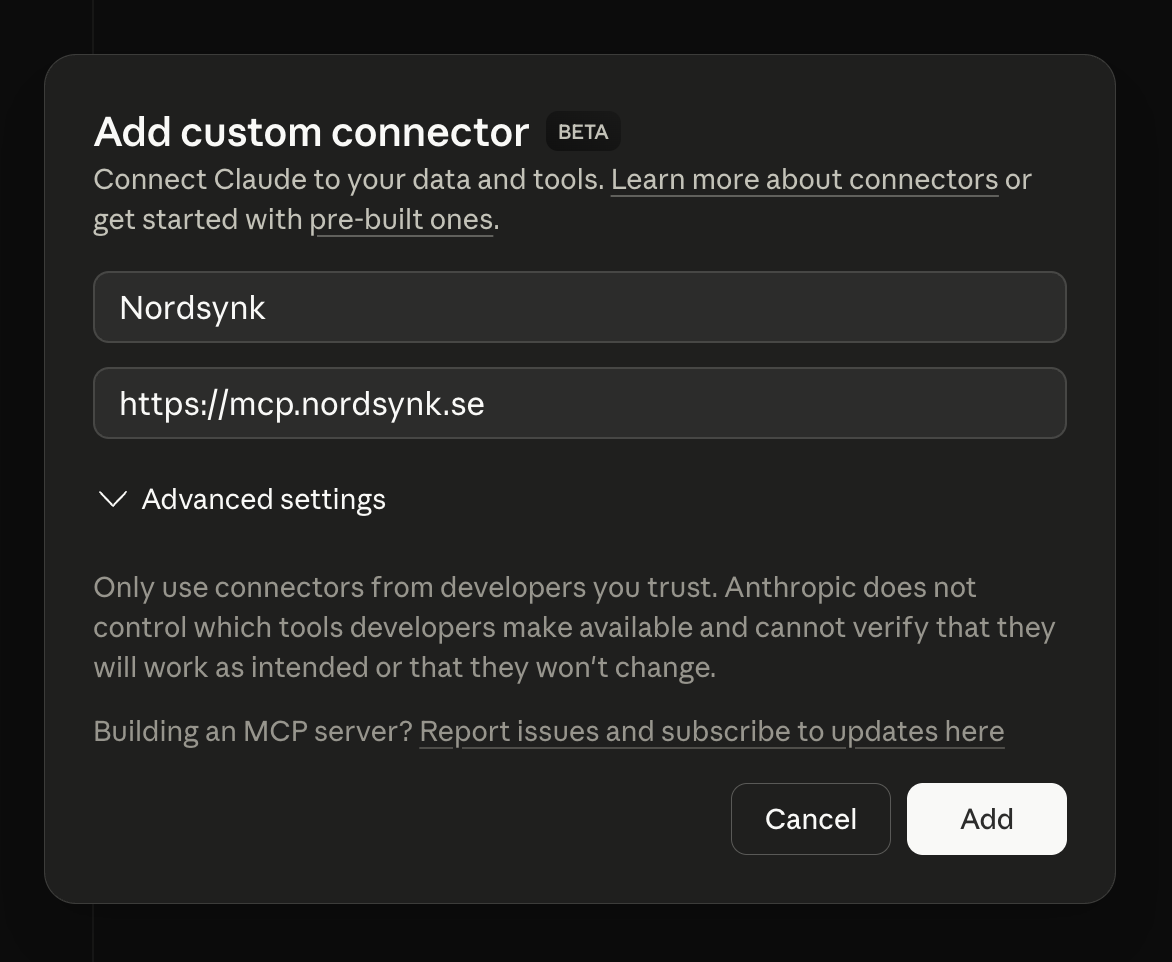
- 1Name: for example Fortnox via Nordsynk.
- 2Address: paste the Nordsynk MCP address, https://mcp.nordsynk.se/mcp.
- 3Click Continue, keep what Claude finds, click Add and then Connect.
Video guide · 4:07
Connect Claude to Fortnox – step by step
Narrated in Swedish with English subtitles. The video plays from YouTube when you click.
How Nordsynk connects Claude to Fortnox
Claude cannot read Fortnox on its own. Nordsynk is the MCP server that makes it possible: a service that lets Claude fetch information from Fortnox and propose changes.
Claude
You ask
in Claude Desktop or claude.ai
Nordsynk
Reads from Fortnox
with your own Fortnox sign-in
Fortnox
Your company
invoices, vouchers, reports
Approval
If you want Claude to change something, Nordsynk opens a preview. The change is only written to Fortnox once you approve.
Nordsynk runs as a hosted service. You install nothing locally and run no server of your own. You sign in to Nordsynk with your email. The company is linked to Fortnox through Fortnox's own permission approval, and Nordsynk never sees your Fortnox password.
Calls to Fortnox use the company's Fortnox connection and the permissions you have in Fortnox. Nordsynk checks access and permissions on every call.
You decide what Claude can reach
You make the Fortnox connection in Fortnox
You sign in to Nordsynk with your email. The company's connection to Fortnox is approved in Fortnox, with your permissions, and Nordsynk never sees your Fortnox password.
You choose the companies
When you add Nordsynk to Claude, you explicitly approve which companies Claude may use. Nordsynk checks access and seat status on every call.
Everything is logged
Nordsynk logs every call to Fortnox with user, time and action.
Frequently asked questions about Fortnox and Claude
How do I connect Claude to Fortnox?
Buy Nordsynk in Fortnox Marketplace and make sure the seat is assigned to you. Then open Customize → Connectors in Claude, choose Add custom connector and paste https://mcp.nordsynk.se/mcp. Sign in to Nordsynk and approve the companies Claude may use. The steps are shown with pictures in the setup guide.
Does Nordsynk work in both Claude Desktop and on claude.ai?
Yes. Both use the Connectors menu and the same address. The purchase in Fortnox is made once, the seat is assigned to each user, and everyone adds the connection in Claude themselves.
Do I need to run an MCP server myself?
No. Nordsynk runs the MCP server as a hosted service. You need no npm, no configuration file and no server of your own, only the Nordsynk address.
What is an MCP server for Claude?
MCP is an open protocol that lets an AI assistant such as Claude fetch information from and carry out tasks in other systems. An MCP server is the service on the other side. Nordsynk is an MCP server for Fortnox.
Can Claude change things in Fortnox, or only read?
Claude can also create and change things, such as customer invoices, credit invoices, vouchers, customers and suppliers. Every change gets a preview and is made only once you have approved it. If you want to skip approving each change, a company can turn on auto-approve.
Can I use Claude for bookkeeping?
Yes, with judgement. Claude can read vouchers and accounts, suggest account coding and prepare a voucher. You review and approve the proposal before it is booked. Responsibility for the books stays with you and the company.
What does it cost to use Claude with Fortnox?
199 SEK per Fortnox company per user per month, through Fortnox. You activate Nordsynk and assign seats in each Fortnox company where the integration will be used. Claude is not included in the price.
Can I use Claude with several Fortnox companies?
Yes. You add Nordsynk to Claude once and approve the companies Claude may use. You need a Nordsynk seat in each company, because the price is per company and user.
Does Nordsynk work with Claude Code?
Yes. Claude Code can connect to remote MCP servers that use sign-in, and Nordsynk is reached at the same address, https://mcp.nordsynk.se/mcp. The setup guide shows how to continue.
How does Nordsynk differ from Fortnox's own AI features?
Fortnox's own AI features work inside Fortnox, for example with invoice interpretation. Nordsynk makes Fortnox available in Claude, so you can ask questions and request changes in plain language outside Fortnox. They complement each other.
Ready to ask Claude about your books?
Buy Nordsynk in Fortnox, assign the seat to yourself and add the address in Claude. It takes a few minutes.